Rocker Switch Tool
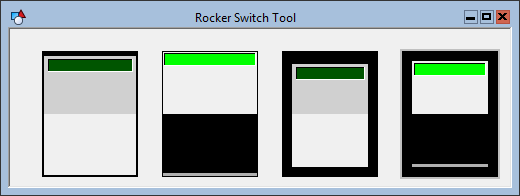
 A Rocker Switch Tool object is a toggle for digital commands. The object must be associated with a digital point. The value of this point sets the position of the switch, and when the position is changed the toggled value is sent as the "value" parameter of the command.
Use the point identifier properties to form a fully qualified CygNet tag string. The point identifier properties are [1:SiteService], [2:Point ID], [3:Long Point ID], [4:Facility ID], and [5:UDC]. If the object is on a templated screen, only use the [5:UDC] property.
Optionally, a Rocker Switch Tool object can be configured to prompt the user to confirm the command before it is sent.
The LED is illuminated and the switch position is up if the digital point is "on." The active ("on") color is specified by the IndicatorActiveColor property. The inactive color is one-third the intensity of the active color.
The BackGroundColor property specifies the color of the object background. The BorderMargin property specifies the margin between the object boundary and the switch. The color between the switch and the boundary edge is always black.
The MouseControlStyle property specifies if a user has to click on the indicator or anywhere on the object to toggle the switch. If the object has focus, a user can also use the SPACEBAR to toggle the object, regardless of the MouseControlStyle property.
The [AlarmElement] property can be set to show the point state color in the object’s Background Color or not at all (None). The [UseCustomStateColors] property enables the object to use its own custom point state colors. If set to 1 - Yes, the colors used are those defined by the object’s [CustomStateColors] property. If set to 0 - No, the colors are those defined by the TheView’s [CustomStateColors] property.
A Rocker Switch does not have a label. Use the LED Switch Tool for a switch with a label.
More:
 Rocker Switch Tool - Command Name
Rocker Switch Tool - Command Prompt
Rocker Switch Tool - Properties, Events, and Methods
Rocker Switch Tool - ActiveX Properties

